

A while ago I introduced Source Control Switcher, a small Visual Studio extension that solves a recurring annoyance: Visual Studio can only have one source control provider active at a time, and it does not pick one per repository. If you work on a Git solution in the morning and on a Subversion or TFVC one in the afternoon, you end up changing Tools > Options > Source Control by hand every time. Source Control Switcher does it for you, as soon as a solution or folder is opened.
The last release on the Visual Studio Marketplace was still the 2020 one, built for Visual Studio 2015–2019. Today I'm happy to announce Source Control Switcher 1.2.0, a substantial update that brings the extension to the current versions of Visual Studio.
What's new in 1.2.0
- Visual Studio 2022 and Visual Studio 2026 (Community, Professional and Enterprise, on x64 and Arm64), with a single package. Users of Visual Studio 2015–2019 can keep using version 1.1.2.
- Team Foundation Version Control (TFVC), detected from the TFVC bindings in the solution file or from a TFVC local workspace.
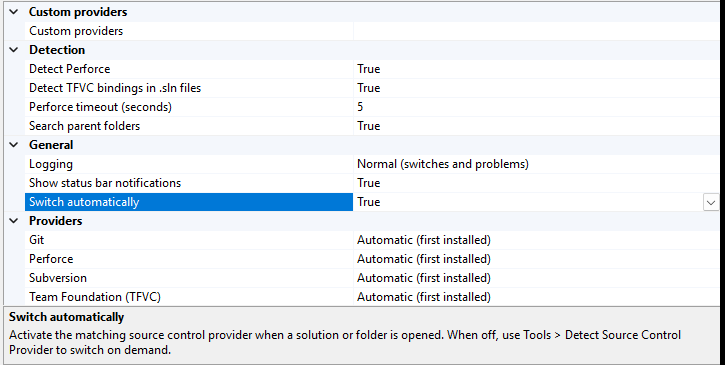
- Tools > Detect Source Control Provider, a new command to run the detection again and switch on demand, for example after changing the provider by hand.
- Custom providers: map a file or folder name to any source control provider by GUID, for clients the extension does not know.
- New options: automatic switching on/off, status bar notifications, logging, parent folder search, TFVC detection, Perforce detection and timeout. Provider choices now have readable names.
- Better detection: Git worktrees and submodules, Open Folder mode, and a Perforce check that runs in the background only when the Perforce client is installed.
- Description of the extension localized in Italian, French and German.
Every switch is logged in the Source Control Switcher pane of the Output window, so it's always clear which provider was activated and why:

Under the hood
Besides the new features, the extension has been largely rewritten following the current practices for Visual Studio extensions: background loading only when a solution or folder opens, no blocking work on the UI thread, and the detection logic separated from Visual Studio and covered by unit tests. The package also went on a diet: it no longer bundles Visual Studio assemblies, going from about 12.9 MB to about 32 KB. Builds, tests and releases now run on GitHub Actions, so new versions reach the Marketplace and GitHub at the same time.
The source control clients that are no longer maintained for current Visual Studio versions (Easy Git Integration Tools / Git Source Control Provider and the Mercurial clients) have been removed; the supported ones are the built-in Git and TFVC providers, VisualSVN, AnkhSVN and P4VS.
Thanks
This release includes contributions and ideas from the community: thanks to QianMoXi, joe-kr (Visual Studio 2022 port and AnkhSVN 2019 support) and davideciarmiello, whose TFVC work this release builds on. And, as always, to Francesco Pretto for the original SccAutoSwitcher.
Download
- From Visual Studio: Extensions > Manage Extensions, search for Source Control Switcher.
- Source Control Switcher on the Visual Studio Marketplace
- Release 1.2.0 on GitHub (VSIX and release notes)
- Source code on GitHub — issues and pull requests are welcome.
The extension is free and open source under the MIT license. If you find it useful, a rating on the Marketplace is much appreciated!